# Source maps
Upload your JavaScript source maps so browser error stacks show your original files, functions and code, and so one bug stays one issue across deploys.
Why upload source maps
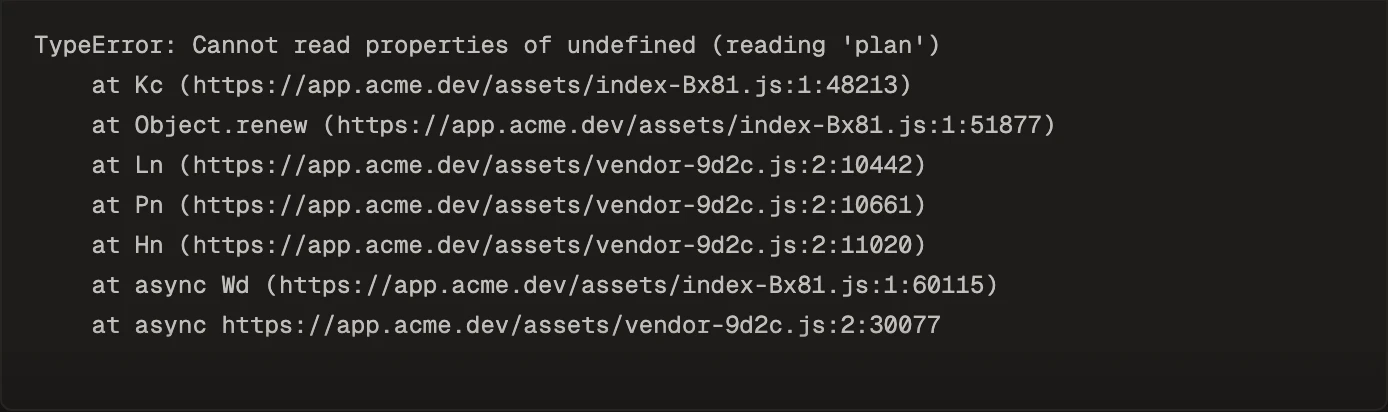
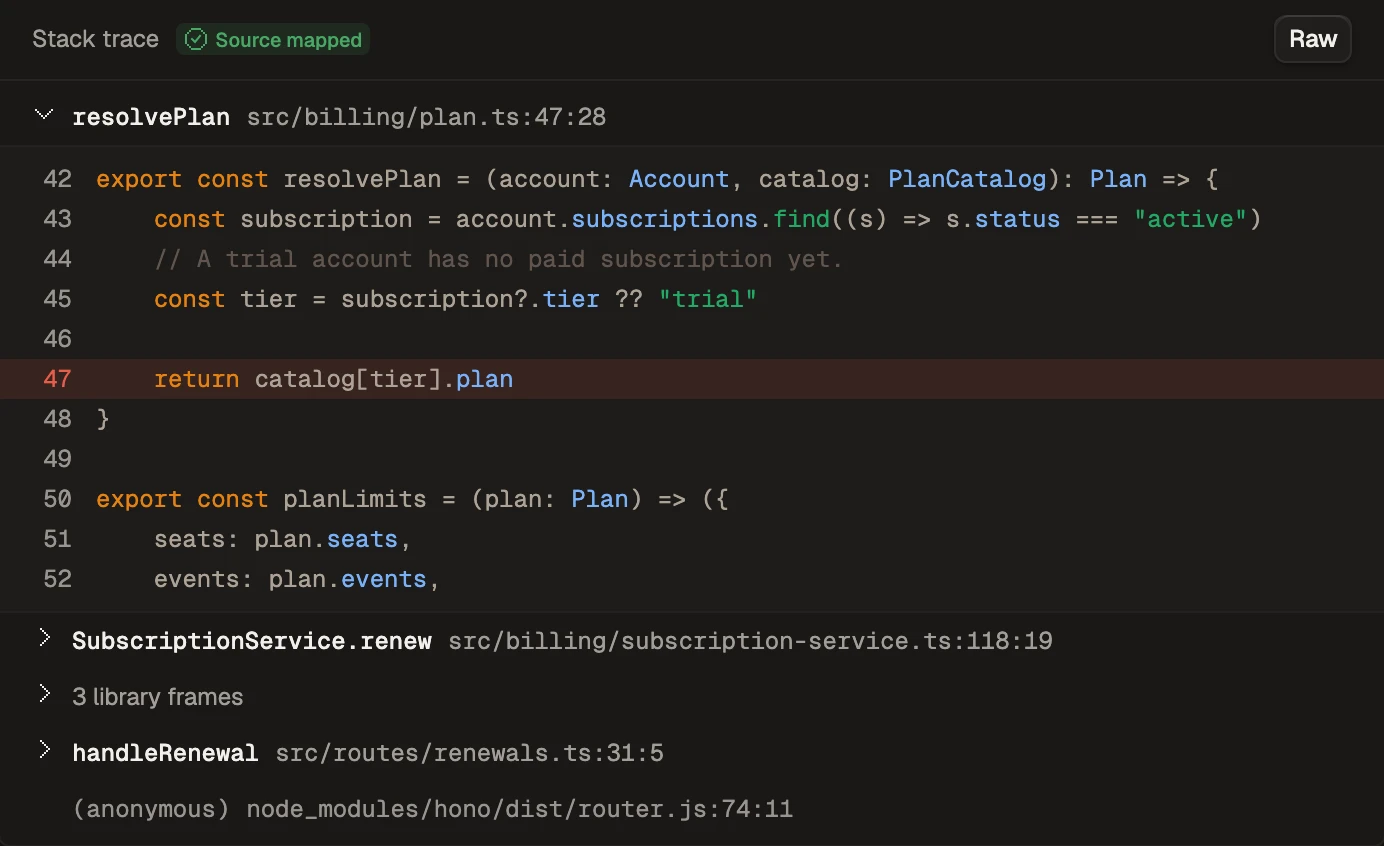
Read the code that broke. Each frame shows your original file, function and line, with the code around it, instead of Kc at index-Bx81.js:1:48213.
One bug stays one issue. Bundlers rename functions and hash file names on every deploy. With maps, Maple groups on your source, so a release does not reopen the same bug as a new issue.
Less noise. Library frames fold away, so the frames you own come first.
What the browser sendsWhat Maple shows with source maps
A minified browser bundle reports errors from files like `assets/index-Bx81.js` at line 1, column 48213, inside a function called `Kc`. Upload the build's source maps and Maple maps each stack frame back to your original file, function, line and column, and shows the code around it on the issue page.
Maps are read when an issue is shown, never served to your users, and never applied to the stored error: the raw stack is kept as sent.
## How a frame finds its map
Maple matches each frame to an uploaded map in one of two ways:
- **By debug id** (recommended). `maple sourcemaps inject` writes a unique id into each built JS file and its map. When the file runs, it registers that id, and [`@maple-dev/browser`](/docs/frontend) 0.17.0 or later sends the ids of the scripts in an error's stack as `maple.exception.debug_ids` on the exception event. Maple then picks the map by id, whatever URL the file was served from. Ids written by Sentry's debug id tooling work too.
- **By release and path**. A map uploaded with a service and release is matched to frames from that `service.name` and `service.version` whose URL path ends with the map's file path. `assets/app.js` matches `https://cdn.example.com/static/assets/app.js`, but `app.js` does not match `assets/myapp.js`. Use this when your telemetry reports no debug ids.
Release matching needs `service.version` on your telemetry to equal the release you upload under. The CLI defaults the release to the build's git commit, so either set `service.version` to that commit or pass the same value to both.
## Upload with the CLI
Use the [Maple CLI](/docs/reference/cli) 0.6.0 or later in your CI, after the build and before the deploy.
1. Build with source maps on. With Vite, set `build.sourcemap: "hidden"` so no public `sourceMappingURL` comment is written. Other bundlers have an equivalent setting.
2. Inject debug ids into the build output:
```bash
maple sourcemaps inject dist
```
Every JS file that has a map gets a debug id, derived from the file and its map, so re-running changes nothing. Add `--dry-run` to see what would change.
3. Upload the maps:
```bash
maple sourcemaps upload dist --service web
```
4. Deploy `dist` as usual. Delete the `.map` files from it first if you do not want them served.
`upload` needs a signed-in workspace: run `maple auth login`, or set `MAPLE_API_URL` and `MAPLE_API_TOKEN` in CI. The token is an API key with the **Source maps** write scope, created by an engineer or admin under **Settings → Keys**.
| Flag | What it does |
| -------------- | --------------------------------------------------------------------------------------------------------------------------------------------------- |
| `--service` | The `service.name` your app reports. Needed for maps without a debug id. |
| `--release` | The `service.version` your app reports. Defaults to `git rev-parse HEAD` in the build directory when `--service` is set. |
| `--url-prefix` | The path the files are served under, prepended to each file's path in the build directory. Set it when `dist/app.js` is served as `/static/app.js`. |
The command uploads one map per JS file, four at a time, and prints each one. It skips a map with a warning when it is over 10 MiB, when it is an index map (one with `sections`), when it lives outside the build directory, or when it has no debug id and no `--service` and `--release` were given. A run that uploads nothing, or where any upload fails, exits non-zero so CI stops.
## Upload with Alchemy
If you deploy with [Alchemy](/docs/iac/alchemy), `@maple-dev/alchemy` 0.8.0 or later does both steps for a Vite app. The Vite plugin turns on hidden source maps, injects debug ids, and moves the maps out of the deployed output into `.maple/sourcemaps/` beside your Vite config, so they are never served:
```ts
// vite.config.ts
import { mapleSourceMaps } from "@maple-dev/alchemy/vite"
import { defineConfig } from "vite"
export default defineConfig({ plugins: [mapleSourceMaps()] })
```
The `Maple.SourceMaps` resource uploads them after the build:
```ts
// alchemy.run.ts
Effect.gen(function* () {
const web = yield* Cloudflare.Website.Vite("web")
yield* Maple.SourceMaps("web-sourcemaps", {
// This Website builds to dist/client. A plain Vite build uses .maple/sourcemaps/dist.
dir: ".maple/sourcemaps/client",
service: "web",
release: process.env.GITHUB_SHA,
after: web.hash,
})
})
```
| Prop | What it does |
| ----------- | ------------------------------------------------------------------------------------------------------------------------------------ |
| `dir` | The plugin's maps directory, or any build output where each JS file has its map beside it. |
| `service` | The `service.name` your app reports. |
| `release` | The `service.version` your app reports. Required with `matchBy: "release"`. |
| `urlPrefix` | The path the files are served under, such as `static/`. |
| `after` | Any value from the build, such as the Website's `hash`. It orders the upload after the build and re-checks the maps when it changes. |
| `matchBy` | `"debugId"` (default) for `@maple-dev/browser`. `"release"` uploads without debug ids, for telemetry that reports none. |
The resource uploads again only when the maps or its props change. Deleting it deletes no maps, because earlier releases still need them.
The plugin options are `mapsDir`, where the maps go, and `environments`, the Vite environments to process (default `["client"]`, the browser bundle). The plugin runs in Node and needs `@effect/platform-node`.
On the first deploy with the plugin, a chunk whose hashed name did not change gets new contents, because the debug id goes in after Rollup names the file. A browser or CDN that cached that chunk may serve the old copy for that one release. Later builds are deterministic.
## Upload with the API
`POST /v2/source_maps` takes one map as the raw request body (`application/json` or `application/octet-stream`). Identify it with query parameters:
| Parameter | Required | Meaning |
| --------------- | --------------------------------------- | -------------------------------------------------- |
| `minified_path` | Yes | The JS file's path relative to the deploy root. |
| `debug_id` | Either this, or `service` and `version` | The debug id written into the JS file and its map. |
| `service` | | The `service.name`. |
| `version` | | The `service.version`. |
```bash
curl -X POST "https://api.maple.dev/v2/source_maps?minified_path=assets/index-Bx81.js&service=web&version=1.4.2" \
-H "Authorization: Bearer $MAPLE_API_TOKEN" \
-H "Content-Type: application/json" \
--data-binary @dist/assets/index-Bx81.js.map
```
- A map must be a version 3 source map with a non-empty `sources` array. Index maps (`sections`) are refused with a 400; emit a regular map.
- Maps over 10 MiB are refused with a 413, the largest map Maple can symbolicate with.
- Uploading a map with the same debug id replaces it. Uploading a map without a debug id for the same service, version and path replaces it too.
`GET /v2/source_maps` lists your maps, filtered by `service`, `version` or `debug_id`. `DELETE /v2/source_maps/{id}` deletes one. Any member can list; uploading and deleting take an engineer or admin and the `source_maps:write` scope. See the [API reference](/docs/reference/api).
## On the issue page
The **Stack trace** on an issue's **Overview** shows the mapped frames, top of the stack first, under a **Source mapped** marker, or **Partly source mapped** when only some frames found a map. Your own frames open on the code around the line when the map embeds `sourcesContent`. Runs of library frames fold into one row. **Raw** switches to the stack exactly as it was sent.
Frames count as library code when their original path is under `node_modules/`, is webpack runtime code, a browser extension or ``, or when the map's `ignoreList` marks their source.
## Grouping on mapped frames
When an organization has source maps, a browser error that groups on its stack frames uses the mapped frames: each in-app frame's original file and function, never a line or column, so a fix elsewhere in the file does not split the issue. A frame with no recovered function name uses its file plus the text of its original source line. A stack that maps nothing groups as before, and [`maple.fingerprint`](/docs/errors/overview#set-the-grouping-yourself) and your organization's grouping rules still come first.
- The first map your organization uploads re-groups its browser errors once, as they recur. Issues that deploys had split can then join one issue.
- An error whose stack carries a debug id waits up to 1 hour from its first sighting for its map before it is grouped. Upload maps in the same pipeline step as the deploy, so they arrive before the first error.
- A map uploaded later than that does not re-group errors already grouped on the raw stack.
## Retention and limits
| Limit | Value |
| ---------------------- | --------------------------------------------------------- |
| Largest map | 10 MiB |
| Map formats | Version 3 regular maps. Index maps are not supported. |
| Retention | A map not used to resolve a stack for 90 days is deleted. |
| Uploading and deleting | Engineers and admins |
The API returns when each map last resolved a stack, to the day, as `last_used_at`.
## Troubleshooting
- **Stacks still show minified code.** Check that the maps uploaded (`GET /v2/source_maps`). With debug ids, check that `inject` ran on the same files you deployed, after any step that rewrites them, and that your app uses `@maple-dev/browser` 0.17.0 or later. Without debug ids, check that `service.version` on the errors equals the uploaded release, and that the uploaded path is the end of the URL path (set `--url-prefix`).
- **Frames map but show no code.** The map has no `sourcesContent`. Turn on embedding the sources in your bundler.
- **`upload` skips every file with "no debug id".** Run `maple sourcemaps inject` first, or pass `--service` and `--release`.
- **An error opened a new issue after a deploy.** Its map arrived more than an hour after the first occurrence. Upload before or with the deploy.
## Next steps
- [Errors and issues](/docs/errors/overview): how issues are grouped and worked.
- [Frontend](/docs/frontend): set up `@maple-dev/browser`.
- [CLI reference](/docs/reference/cli#maple-sourcemaps-inject-dir): every `maple sourcemaps` flag.